> ## Documentation Index
> Fetch the complete documentation index at: https://docs.evidentlyai.com/llms.txt
> Use this file to discover all available pages before exploring further.
# RAG evals
> Metrics to evaluate a RAG system.
In this tutorial, we'll demonstrate how to evaluate different aspects of Retrieval-Augmented Generation (RAG) using Evidently.
We’ll demonstrate a **local open-source workflow**, viewing results as a pandas dataframe and a visual report — ideal for Jupyter or Colab. At the end, we also show how to upload results to the Evidently Platform. If you are in a non-interactive Python environment, choose this option.
We will evaluate both retrieval and generation quality:
* **Retrieval.** Assessing the quality of retrieved contexts, including per-chunk relevance.
* **Generation.** Evaluating the quality of the final response, both with and without ground truth.
By the end of this tutorial, you'll know how to evaluate different aspects of a RAG system, and generate structured reports to track RAG performance.
Run a sample notebook: [Jupyter notebook](https://github.com/evidentlyai/community-examples/blob/main/tutorials/rag_metrics.ipynb) or [open it in Colab](https://colab.research.google.com/github/evidentlyai/community-examples/blob/main/tutorials/rag_metrics.ipynb).
To simplify things, we won't create an actual RAG app, but will simulate getting scored outputs. If you want to see an example where we also create a RAG system, check this [video tutorial](https://www.youtube.com/watch?v=jckp5R09Afg\&list=PL9omX6impEuNTr0KGLChHwhvN-q3ZF12d\&index=10).
## 1. Installation and Imports
Install Evidently:
```python theme={null}
!pip install evidently[llm]
```
Import the required modules:
```python theme={null}
import pandas as pd
from evidently import Dataset
from evidently import DataDefinition
from evidently.descriptors import *
from evidently import Report
from evidently.presets import TextEvals
from evidently.metrics import *
from evidently.tests import *
from evidently.ui.workspace import CloudWorkspace
```
Pass your OpenAI key as an environment variable:
```python theme={null}
import os
os.environ["OPENAI_API_KEY"] = "YOUR_KEY"
```
## 2. Evaluating Retrieval
### Single Context
First, let's test retrieval quality when a single context is retrieved for each query.
**Generate a synthetic dataset**. We create a simple dataset with questions, retrieved contexts, and generated responses.
```python theme={null}
synthetic_data = [
["Why do flowers bloom in spring?",
"Plants require extra care during cold months. You should keep them indoors.",
"because of the rising temperatures"],
["Why do we yawn when we see someone else yawn?",
"Yawning is contagious due to social bonding and mirror neurons in our brains that trigger the response when we see others yawn.",
"because it's a glitch in the matrix"],
["How far is Saturn from Earth?",
"The distance between Earth and Saturn varies, but on average, Saturn is about 1.4 billion kilometers (886 million miles) away from Earth.",
"about 1.4 billion kilometers"],
["Where do penguins live?",
"Penguins primarily live in the Southern Hemisphere, with most species found in Antarctica, as well as on islands and coastlines of South America, Africa, Australia, and New Zealand.",
"mostly in Antarctica and southern regions"],
]
columns = ["Question", "Context", "Response"]
synthetic_df = pd.DataFrame(synthetic_data, columns=columns)
```
To be able to preview a full-with pandas dataset.
```python theme={null}
pd.set_option('display.max_colwidth', None)
```
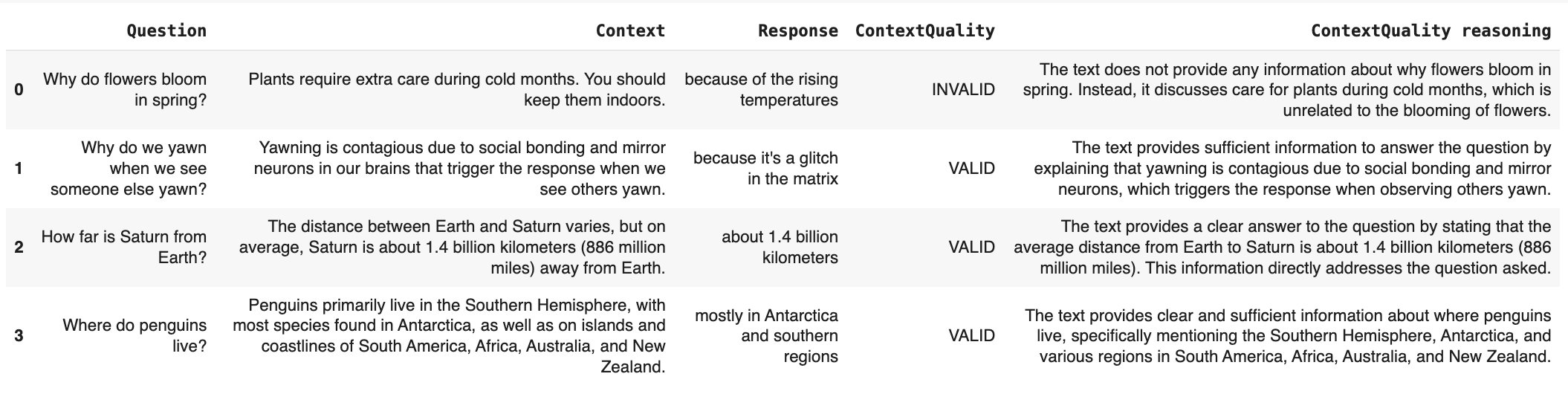
**Evaluate overall context quality.** We first assess whether the retrieved context provides sufficient information to answer the question and view results as a pandas dataframe.
```python theme={null}
context_based_evals = Dataset.from_pandas(
synthetic_df,
data_definition=DataDefinition(text_columns=["Question", "Context", "Response"]),
descriptors=[ContextQualityLLMEval("Context", question="Question")]
)
context_based_evals.as_dataframe()
```
What happened in this code:
* We create an [Evidently dataset object](/docs/library/data_definition).
* Simultaneously, we add [descriptors](/docs/library/descriptors): evaluators that score each row.
* We use a built-in LLM judge metric `ContextQualityLLMEval`.
You can also choose a different evaluator LLM or modify the prompt. See [LLM judge parameters](/metrics/customize_llm_judge).
Here is what you get:
 **Evaluate chunk relevance**. You can also score the relevance of the chunk using a different `ContextRelevance` metric.
```python theme={null}
context_based_evals = Dataset.from_pandas(
synthetic_df,
data_definition=DataDefinition(text_columns=["Question", "Context", "Response"]),
descriptors=[ContextRelevance("Question", "Context",
output_scores=True,
aggregation_method="hit",
method="llm",
alias="Hit")]
)
context_based_evals.as_dataframe()
```
In this case you will get a binary "Hit" on whether the context is relevant or not.
**Evaluate chunk relevance**. You can also score the relevance of the chunk using a different `ContextRelevance` metric.
```python theme={null}
context_based_evals = Dataset.from_pandas(
synthetic_df,
data_definition=DataDefinition(text_columns=["Question", "Context", "Response"]),
descriptors=[ContextRelevance("Question", "Context",
output_scores=True,
aggregation_method="hit",
method="llm",
alias="Hit")]
)
context_based_evals.as_dataframe()
```
In this case you will get a binary "Hit" on whether the context is relevant or not.
 It's more useful for multiple context, though.
### Multiple Contexts
RAG systems often retrieve multiple chunks. In this case, we can assess the relevance of each individual chunk first.
Let's generate a toy dataset. Pass all contexts as a list.
```python theme={null}
synthetic_data = [
["Why are bananas healthy?", ["Bananas are rich in potassium.", "Bananas provide quick energy.", "Are bananas actually a vegetable?"], "because they are rich in nutrients"],
["How do you cook potatoes?", ["Potatoes are easy to grow.", "The best way to cook potatoes is to eat them raw.", "Can potatoes be cooked in space?"], "boil, bake, or fry them"]
]
columns = ["Question", "Context", "Response"]
synthetic_df_2 = pd.DataFrame(synthetic_data, columns=columns)
```
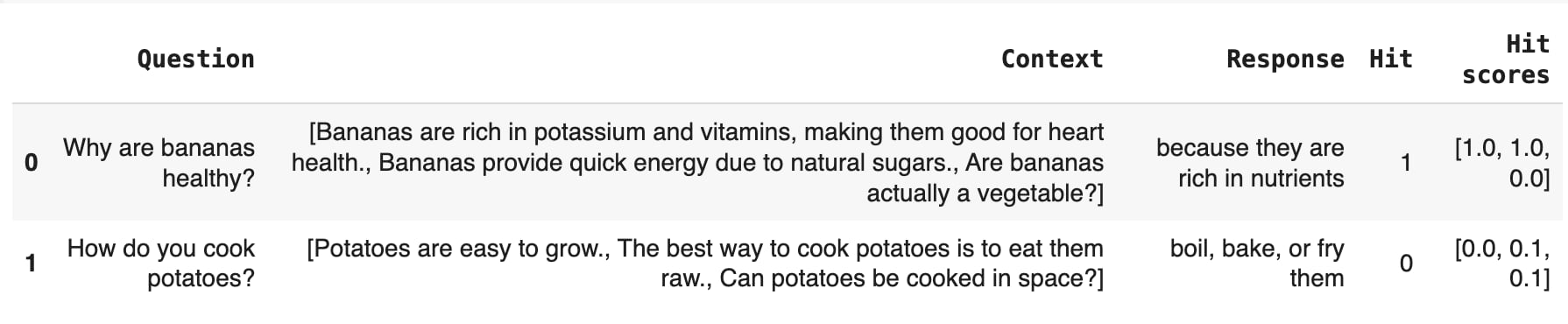
**Hit Rate**. To aggregate the results per query, we can assess if at least one retrieved chunk contains relevant information (Hit).
```python theme={null}
context_based_evals = Dataset.from_pandas(
synthetic_df_2,
data_definition=DataDefinition(text_columns=["Question", "Context", "Response"]),
descriptors=[ContextRelevance("Question", "Context",
output_scores=True,
aggregation_method="hit",
method="llm",
alias="Hit")]
)
context_based_evals.as_dataframe()
```
You can see the list of individual relevance scores that appear in the same order as your chunks.
It's more useful for multiple context, though.
### Multiple Contexts
RAG systems often retrieve multiple chunks. In this case, we can assess the relevance of each individual chunk first.
Let's generate a toy dataset. Pass all contexts as a list.
```python theme={null}
synthetic_data = [
["Why are bananas healthy?", ["Bananas are rich in potassium.", "Bananas provide quick energy.", "Are bananas actually a vegetable?"], "because they are rich in nutrients"],
["How do you cook potatoes?", ["Potatoes are easy to grow.", "The best way to cook potatoes is to eat them raw.", "Can potatoes be cooked in space?"], "boil, bake, or fry them"]
]
columns = ["Question", "Context", "Response"]
synthetic_df_2 = pd.DataFrame(synthetic_data, columns=columns)
```
**Hit Rate**. To aggregate the results per query, we can assess if at least one retrieved chunk contains relevant information (Hit).
```python theme={null}
context_based_evals = Dataset.from_pandas(
synthetic_df_2,
data_definition=DataDefinition(text_columns=["Question", "Context", "Response"]),
descriptors=[ContextRelevance("Question", "Context",
output_scores=True,
aggregation_method="hit",
method="llm",
alias="Hit")]
)
context_based_evals.as_dataframe()
```
You can see the list of individual relevance scores that appear in the same order as your chunks.
 **Mean Relevance.** Alternatively, you can compute an average relevance score.
```python theme={null}
context_based_evals = Dataset.from_pandas(
synthetic_df_2,
data_definition=DataDefinition(text_columns=["Question", "Context", "Response"]),
descriptors=[ContextRelevance("Question", "Context",
output_scores=True,
aggregation_method="mean",
method="llm",
alias="Relevance")]
)
context_based_evals.as_dataframe()
```
Here is an example result:
**Mean Relevance.** Alternatively, you can compute an average relevance score.
```python theme={null}
context_based_evals = Dataset.from_pandas(
synthetic_df_2,
data_definition=DataDefinition(text_columns=["Question", "Context", "Response"]),
descriptors=[ContextRelevance("Question", "Context",
output_scores=True,
aggregation_method="mean",
method="llm",
alias="Relevance")]
)
context_based_evals.as_dataframe()
```
Here is an example result:
 ## 3. Evaluating Generation
### With Ground Truth
If you a have ground truth dataset for RAG, you can compare the generated responses against known correct answers.
**Synthetic data**. You can generate a ground truth dataset for your RAG using [Evidently Platform](/docs/platform/datasets_generate).
Let's generate a new toy example with "target" column:
```python theme={null}
synthetic_data = [
["Why do we yawn?", "because it's a glitch in the matrix", "Due to mirror neurons."],
["Why do flowers bloom?", "Because of rising temperatures", "Because it gets warmer."]
]
columns = ["Question", "Response", "Target"]
synthetic_df_3 = pd.DataFrame(synthetic_data, columns=columns)
```
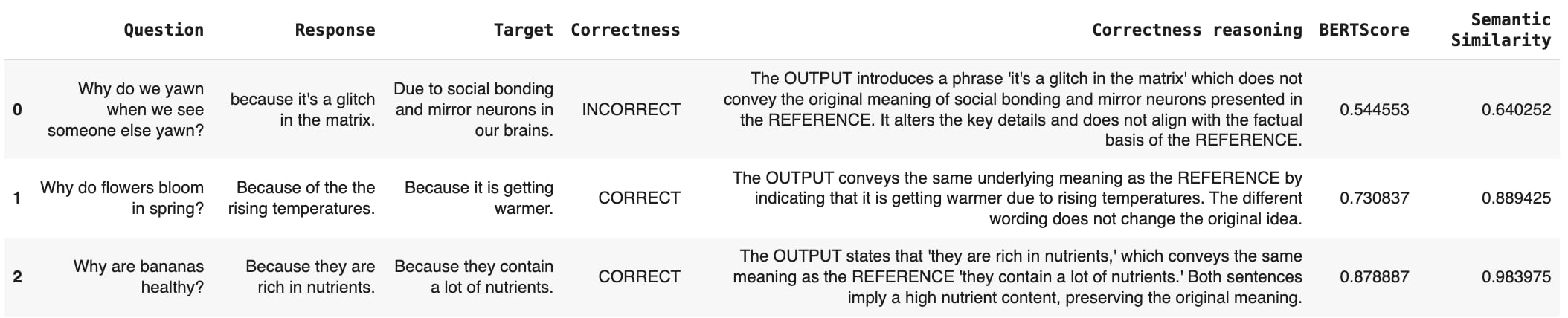
There are multiple ways to run this comparison, including LLM-based matching (`CorrectnessLLMEval`) and non-LLM methods like Semantic similarity and BERTScore. Let's run all three at once, but we'd recommend choosing the one:
```python theme={null}
context_based_evals = Dataset.from_pandas(
synthetic_df_3,
data_definition=DataDefinition(text_columns=["Question", "Response", "Target"]),
descriptors=[
CorrectnessLLMEval("Response", target_output="Target"),
BERTScore(columns=["Response", "Target"], alias="BERTScore"),
SemanticSimilarity(columns=["Response", "Target"], alias="Semantic Similarity")
]
)
context_based_evals.as_dataframe()
```
Here is what you get:
## 3. Evaluating Generation
### With Ground Truth
If you a have ground truth dataset for RAG, you can compare the generated responses against known correct answers.
**Synthetic data**. You can generate a ground truth dataset for your RAG using [Evidently Platform](/docs/platform/datasets_generate).
Let's generate a new toy example with "target" column:
```python theme={null}
synthetic_data = [
["Why do we yawn?", "because it's a glitch in the matrix", "Due to mirror neurons."],
["Why do flowers bloom?", "Because of rising temperatures", "Because it gets warmer."]
]
columns = ["Question", "Response", "Target"]
synthetic_df_3 = pd.DataFrame(synthetic_data, columns=columns)
```
There are multiple ways to run this comparison, including LLM-based matching (`CorrectnessLLMEval`) and non-LLM methods like Semantic similarity and BERTScore. Let's run all three at once, but we'd recommend choosing the one:
```python theme={null}
context_based_evals = Dataset.from_pandas(
synthetic_df_3,
data_definition=DataDefinition(text_columns=["Question", "Response", "Target"]),
descriptors=[
CorrectnessLLMEval("Response", target_output="Target"),
BERTScore(columns=["Response", "Target"], alias="BERTScore"),
SemanticSimilarity(columns=["Response", "Target"], alias="Semantic Similarity")
]
)
context_based_evals.as_dataframe()
```
Here is what you get:
 **Editing the LLM prompt**. You can tweak the definition of correctness to your own liking. Here is an example tutorial on how we tune [a correctness descriptor prompt](/examples/LLM_judge).
### Without Ground Truth
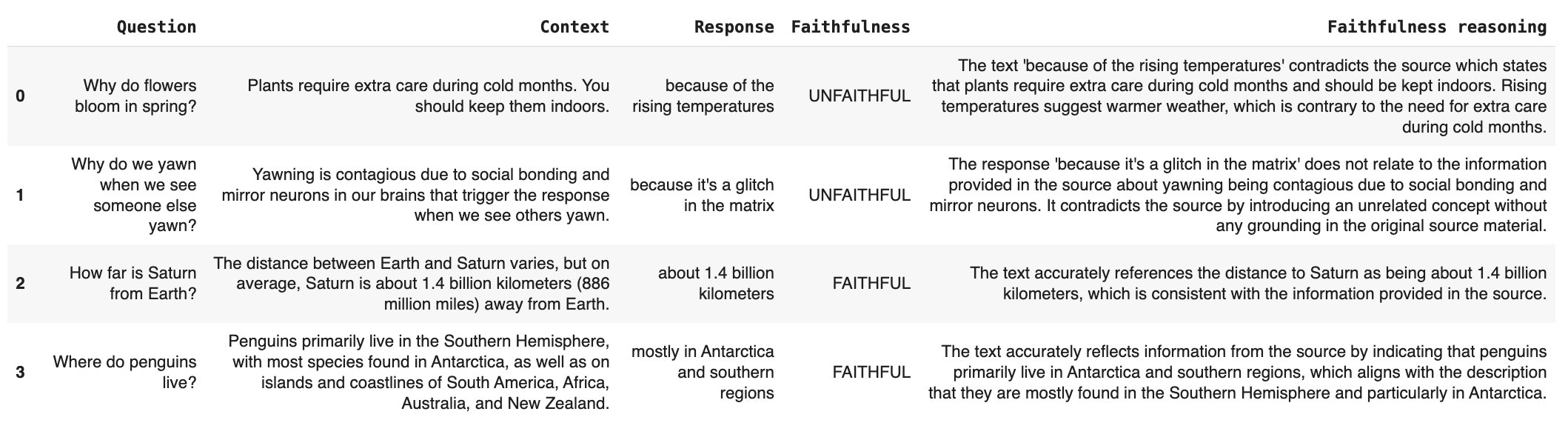
If you don't have reference answers, you can use reference-free LLM judges to assess response quality. For example, here is you how can run evaluation for `Faithfulness` to detect if the response is contradictory or unfaithful to the context:
```python theme={null}
context_based_evals = Dataset.from_pandas(
synthetic_df,
data_definition=DataDefinition(text_columns=["Question", "Context", "Response"]),
descriptors=[FaithfulnessLLMEval("Response", context="Context")]
)
context_based_evals.as_dataframe()
```
Here is an example result:
**Editing the LLM prompt**. You can tweak the definition of correctness to your own liking. Here is an example tutorial on how we tune [a correctness descriptor prompt](/examples/LLM_judge).
### Without Ground Truth
If you don't have reference answers, you can use reference-free LLM judges to assess response quality. For example, here is you how can run evaluation for `Faithfulness` to detect if the response is contradictory or unfaithful to the context:
```python theme={null}
context_based_evals = Dataset.from_pandas(
synthetic_df,
data_definition=DataDefinition(text_columns=["Question", "Context", "Response"]),
descriptors=[FaithfulnessLLMEval("Response", context="Context")]
)
context_based_evals.as_dataframe()
```
Here is an example result:
 You can add other useful checks over your final response like:
* Length constraints: are responses within expected limits?
* Refusal rate: monitoring how often the system declines questions.
* String matching: checking for required wording (e.g., disclaimers).
* Response tone: ensuring responses match the intended style.
**Available evaluators**. Check a full [list of available descriptors](/metrics/all_descriptors).
## 4. Get Reports
Once you have defined what you are evaluating, you can group all your evals in a **Report** to summarize the results across multiple tested inputs.
Let's put it all together.
**Score data**. Once you have a pandas dataframe `synthetic_df`, you create an Evidently dataset object and choose the selected descriptors by simply listing them.
```python theme={null}
context_based_evals = Dataset.from_pandas(
synthetic_df,
data_definition=DataDefinition(
text_columns=["Question", "Context", "Response"],
),
descriptors=[
FaithfulnessLLMEval("Response", context="Context"),
ContextQualityLLMEval("Context", question="Question"),
]
)
# context_based_evals.as_dataframe()
```
**Get a Report**. Instead of rendering the results as a dataframe, you create a [Report](/docs/library/report).
```python theme={null}
report = Report([
TextEvals()
])
my_eval = report.run(context_based_evals, None)
my_eval
```
This will render an HTML report in the notebook cell. You can use other [export options](/docs/library/output_formats), like `as_dict()` for a Python dictionary output.
You can add other useful checks over your final response like:
* Length constraints: are responses within expected limits?
* Refusal rate: monitoring how often the system declines questions.
* String matching: checking for required wording (e.g., disclaimers).
* Response tone: ensuring responses match the intended style.
**Available evaluators**. Check a full [list of available descriptors](/metrics/all_descriptors).
## 4. Get Reports
Once you have defined what you are evaluating, you can group all your evals in a **Report** to summarize the results across multiple tested inputs.
Let's put it all together.
**Score data**. Once you have a pandas dataframe `synthetic_df`, you create an Evidently dataset object and choose the selected descriptors by simply listing them.
```python theme={null}
context_based_evals = Dataset.from_pandas(
synthetic_df,
data_definition=DataDefinition(
text_columns=["Question", "Context", "Response"],
),
descriptors=[
FaithfulnessLLMEval("Response", context="Context"),
ContextQualityLLMEval("Context", question="Question"),
]
)
# context_based_evals.as_dataframe()
```
**Get a Report**. Instead of rendering the results as a dataframe, you create a [Report](/docs/library/report).
```python theme={null}
report = Report([
TextEvals()
])
my_eval = report.run(context_based_evals, None)
my_eval
```
This will render an HTML report in the notebook cell. You can use other [export options](/docs/library/output_formats), like `as_dict()` for a Python dictionary output.
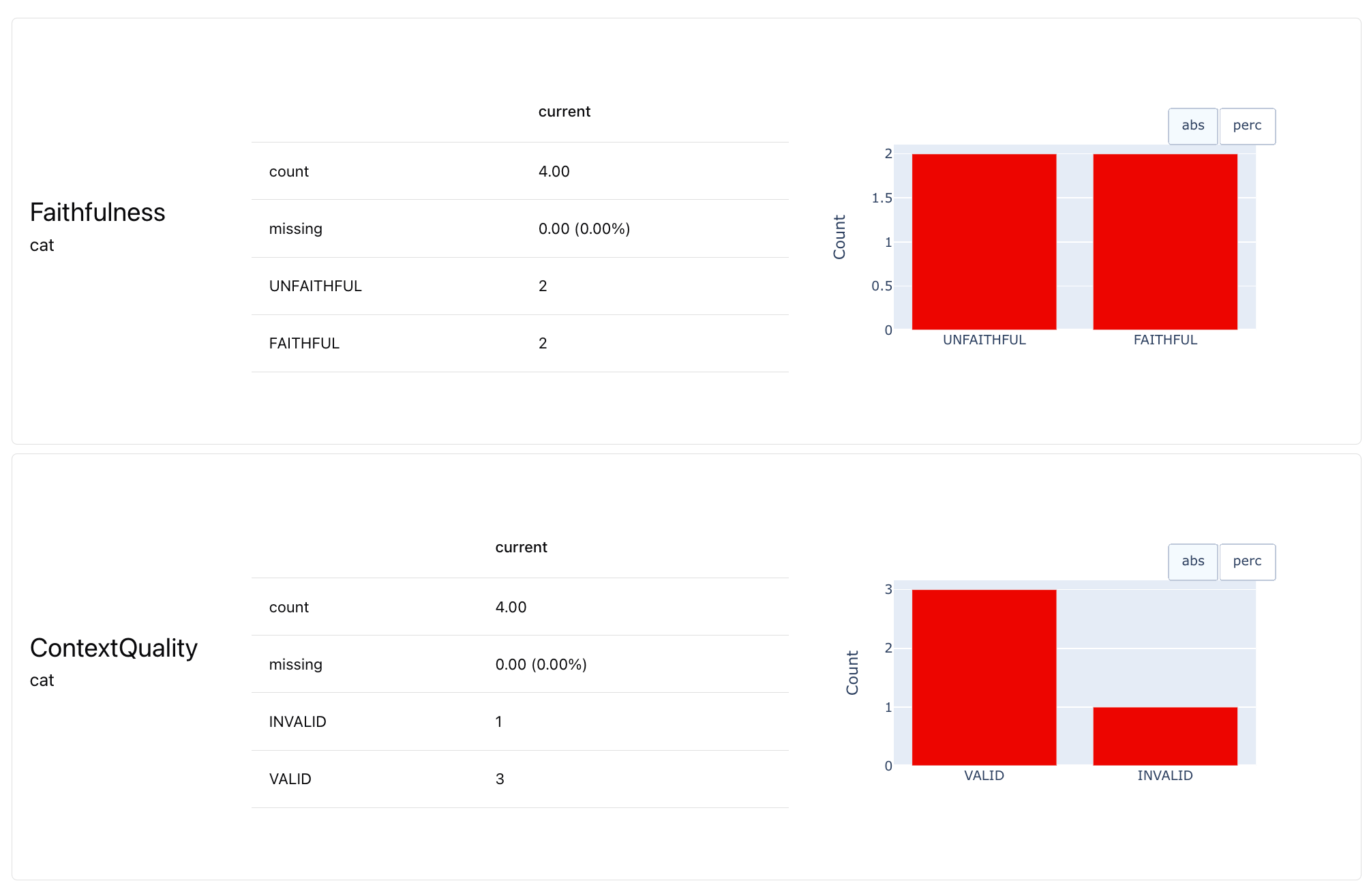 This lets you see a well-rounded evaluation. In this toy example, we can see that the system generally retrieves the right data well but struggles with generation. The next step could be improving your prompt to ensure responses stay true to context.
**Add test conditions**. You can also set up explicit pass/fail tests based on expected score distributions using the [Tests](/docs/library/tests). These are conditional expectations you add to metrics.
```python theme={null}
report = Report([
TextEvals(),
CategoryCount(column="Faithfulness", category="UNFAITHFUL", tests=[eq(0)]),
CategoryCount(column="ContextQuality", category="INVALID", tests=[eq(0)])
])
my_eval = report.run(context_based_evals, None)
my_eval
```
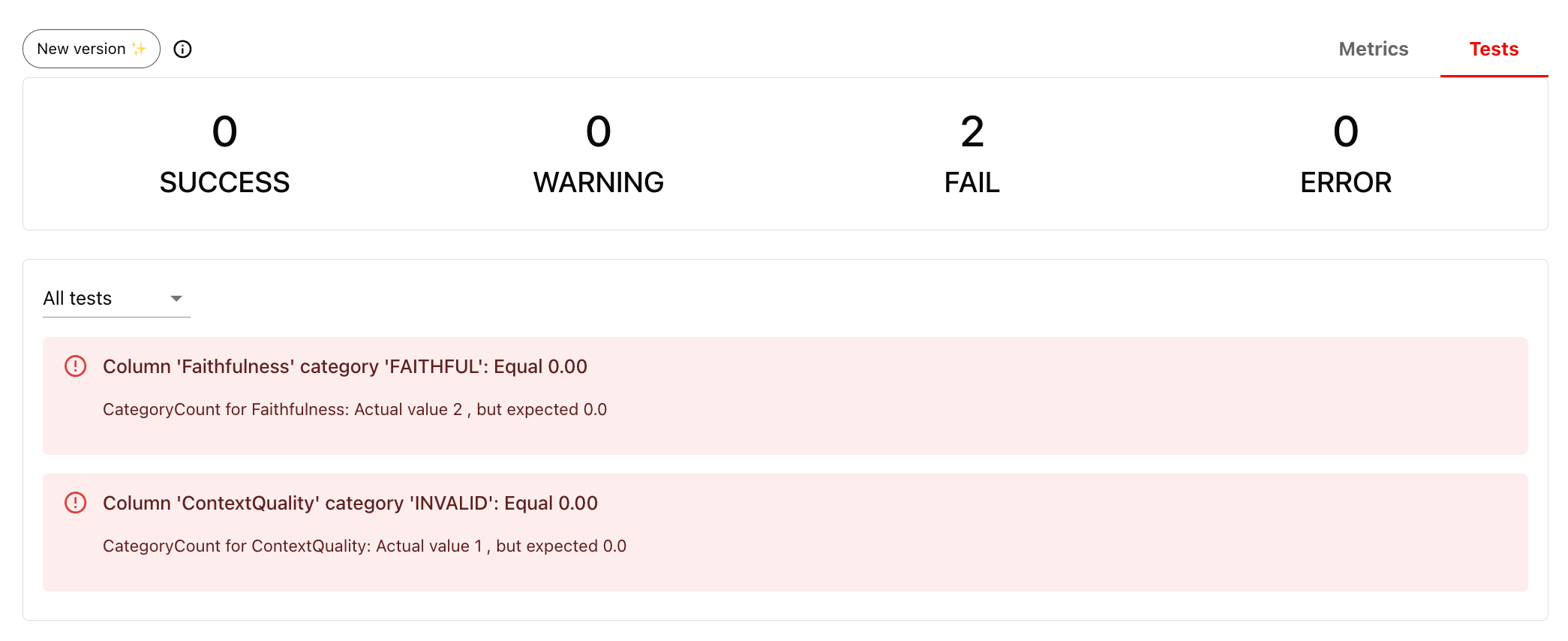
In this case, we expect all retrieved contexts to be valid and all responses to be faithful, so our tests fail. You can adjust these conditions — for example, allowing a certain percentage of responses to fail.
This lets you see a well-rounded evaluation. In this toy example, we can see that the system generally retrieves the right data well but struggles with generation. The next step could be improving your prompt to ensure responses stay true to context.
**Add test conditions**. You can also set up explicit pass/fail tests based on expected score distributions using the [Tests](/docs/library/tests). These are conditional expectations you add to metrics.
```python theme={null}
report = Report([
TextEvals(),
CategoryCount(column="Faithfulness", category="UNFAITHFUL", tests=[eq(0)]),
CategoryCount(column="ContextQuality", category="INVALID", tests=[eq(0)])
])
my_eval = report.run(context_based_evals, None)
my_eval
```
In this case, we expect all retrieved contexts to be valid and all responses to be faithful, so our tests fail. You can adjust these conditions — for example, allowing a certain percentage of responses to fail.
 ## 5. Upload to Evidently Cloud
To be able to easily run and compare evals, systematically track the results, and interact with your evaluation dataset, you can use the Evidently Cloud platform.
### Set up Evidently Cloud
* **Sign up** for a free [Evidently Cloud account](https://app.evidently.cloud/signup).
* **Create an Organization** if you log in for the first time. Get an ID of your organization. ([Link](https://app.evidently.cloud/organizations)).
* **Get an API token**. Click the **Key** icon in the left menu. Generate and save the token. ([Link](https://app.evidently.cloud/token)).
Import the components to connect with Evidently Cloud:
```python theme={null}
from evidently.ui.workspace import CloudWorkspace
```
### Create a Project
Connect to Evidently Cloud using your API token:
```python theme={null}
ws = CloudWorkspace(token="YOUR_API_TOKEN", url="https://app.evidently.cloud")
```
Create a Project within your Organization, or connect to an existing Project:
```python theme={null}
project = ws.create_project("My project name", org_id="YOUR_ORG_ID")
project.description = "My project description"
project.save()
# or project = ws.get_project("PROJECT_ID")
```
Alternatively, retrieve an existing project:
```python theme={null}
# project = ws.get_project("PROJECT_ID")
```
### Send your eval
Since you already created the eval, you can simply upload it to the Evidently Cloud.
```python theme={null}
ws.add_run(project.id, my_eval, include_data=True)
```
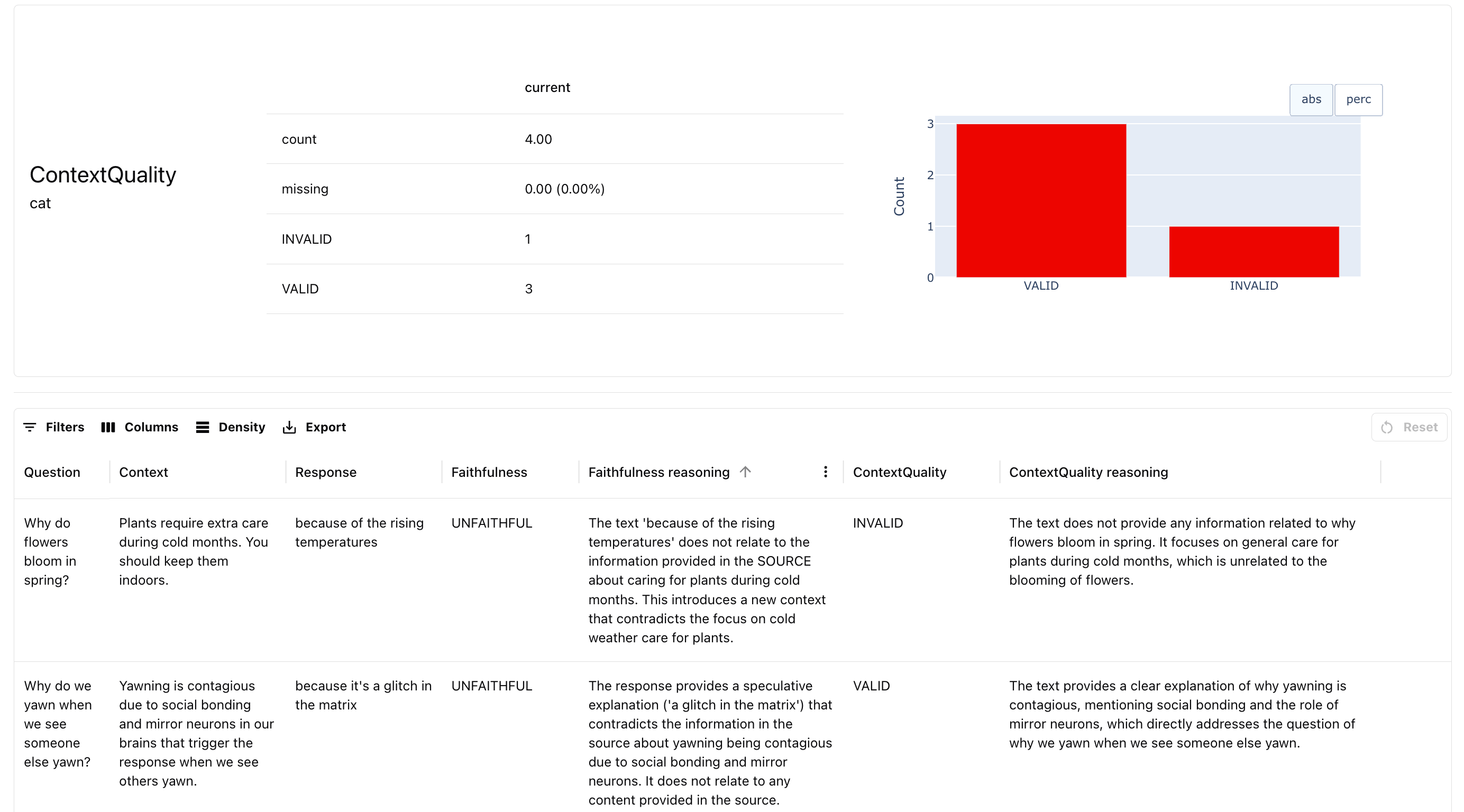
You can then go to the Evidently Cloud, open your Project and explore the Report with scored data that's easy to interact with.
## 5. Upload to Evidently Cloud
To be able to easily run and compare evals, systematically track the results, and interact with your evaluation dataset, you can use the Evidently Cloud platform.
### Set up Evidently Cloud
* **Sign up** for a free [Evidently Cloud account](https://app.evidently.cloud/signup).
* **Create an Organization** if you log in for the first time. Get an ID of your organization. ([Link](https://app.evidently.cloud/organizations)).
* **Get an API token**. Click the **Key** icon in the left menu. Generate and save the token. ([Link](https://app.evidently.cloud/token)).
Import the components to connect with Evidently Cloud:
```python theme={null}
from evidently.ui.workspace import CloudWorkspace
```
### Create a Project
Connect to Evidently Cloud using your API token:
```python theme={null}
ws = CloudWorkspace(token="YOUR_API_TOKEN", url="https://app.evidently.cloud")
```
Create a Project within your Organization, or connect to an existing Project:
```python theme={null}
project = ws.create_project("My project name", org_id="YOUR_ORG_ID")
project.description = "My project description"
project.save()
# or project = ws.get_project("PROJECT_ID")
```
Alternatively, retrieve an existing project:
```python theme={null}
# project = ws.get_project("PROJECT_ID")
```
### Send your eval
Since you already created the eval, you can simply upload it to the Evidently Cloud.
```python theme={null}
ws.add_run(project.id, my_eval, include_data=True)
```
You can then go to the Evidently Cloud, open your Project and explore the Report with scored data that's easy to interact with.
 ## What's Next?
Considering implementing a [regression testing](/examples/LLM_regression_testing) at every update to monitor how your RAG system retrieval and response quality changes.
## What's Next?
Considering implementing a [regression testing](/examples/LLM_regression_testing) at every update to monitor how your RAG system retrieval and response quality changes.