> ## Documentation Index
> Fetch the complete documentation index at: https://docs.evidentlyai.com/llms.txt
> Use this file to discover all available pages before exploring further.
# Overview
> Running evals on the platform.
You may need evaluations at different stages of your AI product development:
* **Ad hoc analysis.** Spot-check the quality of your data or AI outputs.
* **Experiments**. Test different parameters, models, or prompts and compare outcomes.
* **Safety and adversarial testing.** Evaluate how your system handles edge cases and adversarial inputs, including on synthetic data.
* **Regression testing.** Ensure the performance does not degrade after updates or fixes.
* **Monitoring**. Track the response quality for production systems.
Evidently supports all these workflows. You can run evals locally or directly on the platform.
## Evaluations via API
Supported in: `Evidently OSS`, `Evidently Cloud` and `Evidently Enterprise`.
This is perfect for experiments, CI/CD workflows, or custom evaluation pipelines.
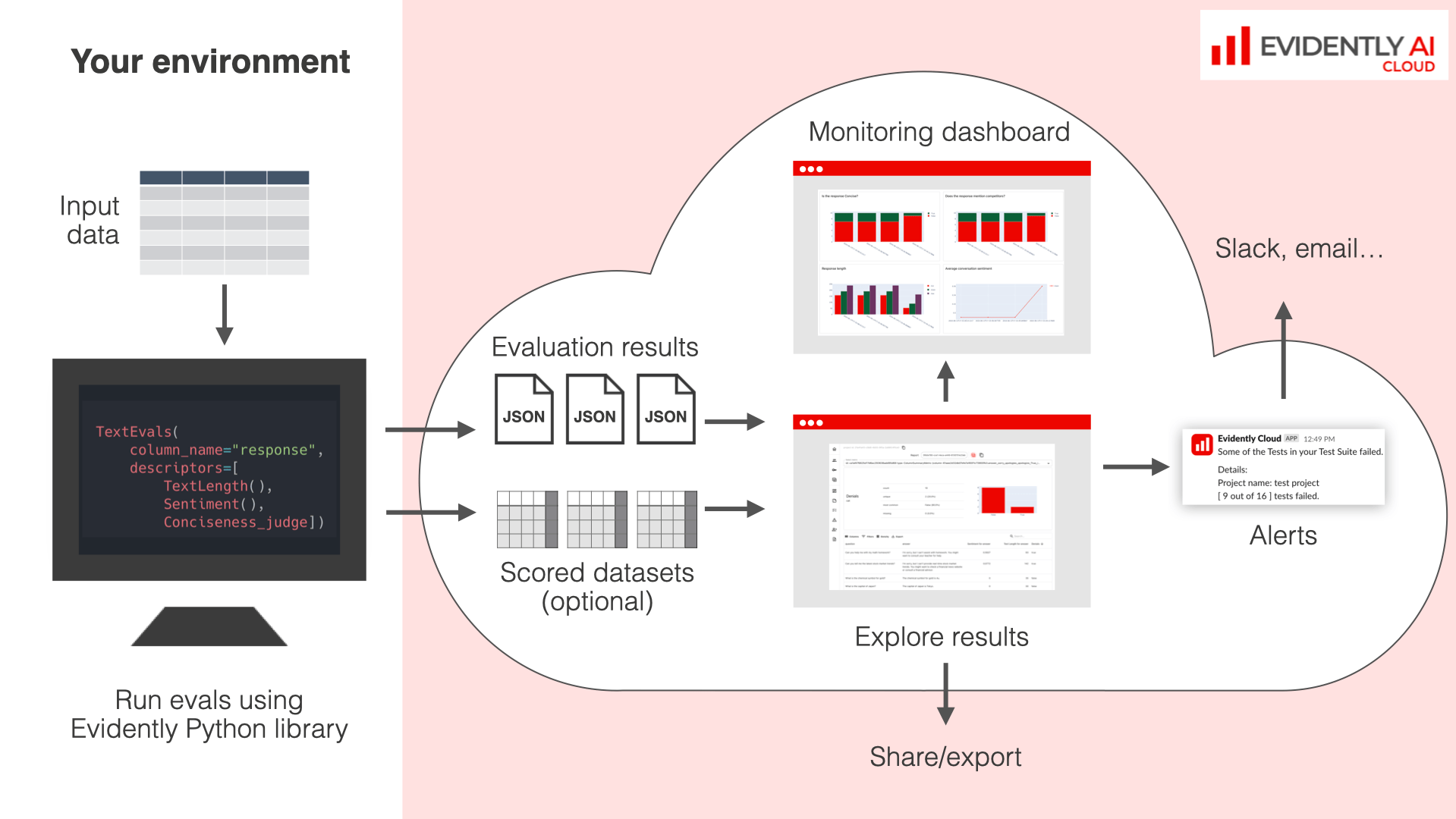 **How it works**:
* Run Python-based evaluations on your AI outputs by generating Reports.
* Upload results to the Evidently Platform.
* Use the Explore feature to compare and debug results between runs.
**Next step:** check the Quickstart for [ML](/quickstart_ml) or [LLM](/quickstart_llm).
## No-code evaluations
Supported in `Evidently Cloud` and `Evidently Enterprise`.
This option lets you run evaluations directly in the user interface. This is great for non-technical users or when you prefer to run evaluations on Evidently infrastructure.
**How it works**:
* Run Python-based evaluations on your AI outputs by generating Reports.
* Upload results to the Evidently Platform.
* Use the Explore feature to compare and debug results between runs.
**Next step:** check the Quickstart for [ML](/quickstart_ml) or [LLM](/quickstart_llm).
## No-code evaluations
Supported in `Evidently Cloud` and `Evidently Enterprise`.
This option lets you run evaluations directly in the user interface. This is great for non-technical users or when you prefer to run evaluations on Evidently infrastructure.
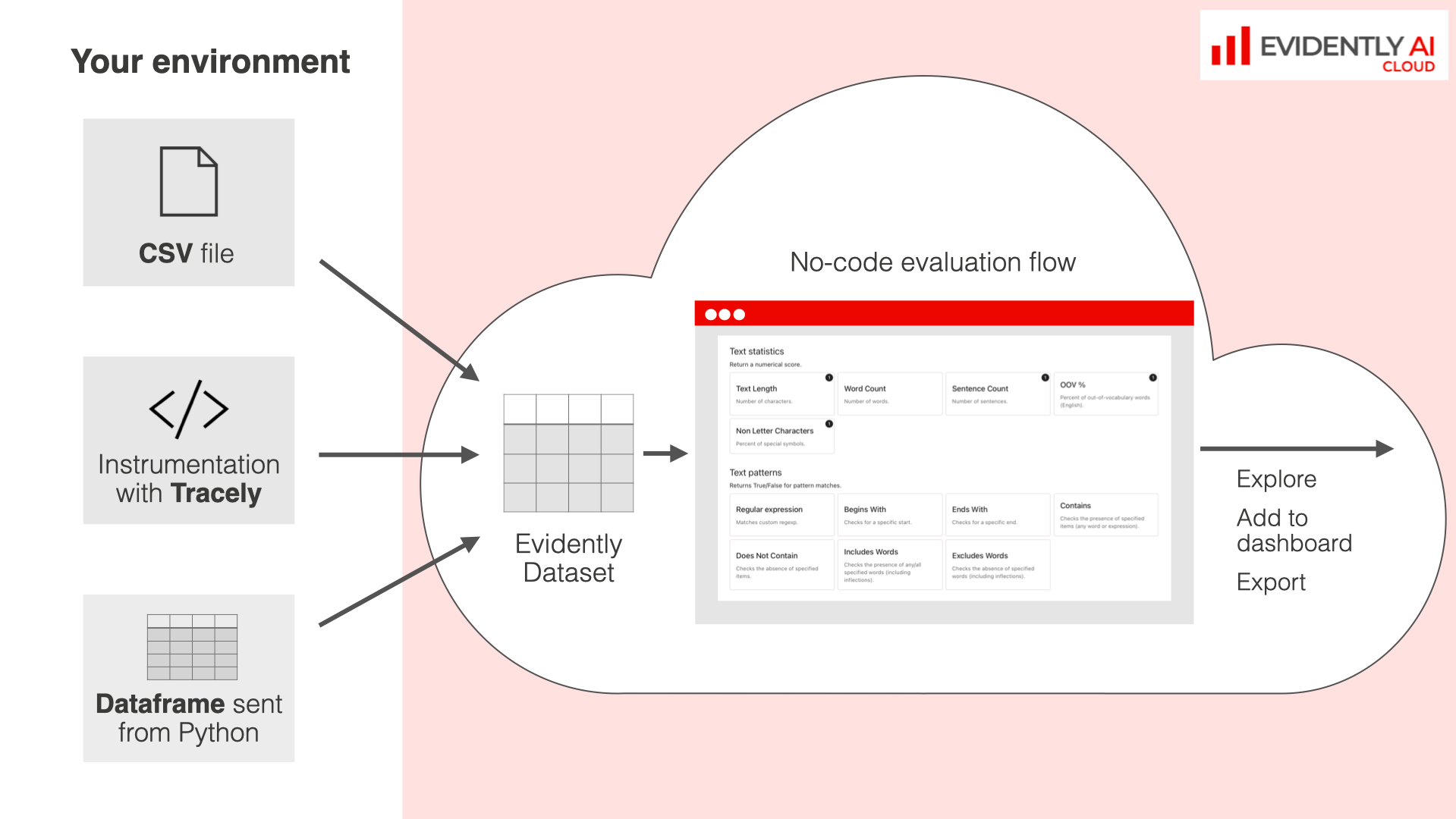 **How it works**:
* **Analyze CSV datasets**. Drag and drop CSV files and evaluate their contents on the Platform.
* **Evaluate uploaded datasets**. Assess collected [traces](/docs/platform/tracing_overview) from instrumented LLM applications or any [Datasets](/docs/platform/datasets_overview) you previously uploaded or generated.
No-code workflows create the same Reports or Test Suites you'd generate using Python. The rest of the workflow is the same. After you run your evals with any method, you can access the results in the Explore view for further analysis.
**Next step:** check the Guide for [No-code evals](/docs/platform/evals_no_code).
**How it works**:
* **Analyze CSV datasets**. Drag and drop CSV files and evaluate their contents on the Platform.
* **Evaluate uploaded datasets**. Assess collected [traces](/docs/platform/tracing_overview) from instrumented LLM applications or any [Datasets](/docs/platform/datasets_overview) you previously uploaded or generated.
No-code workflows create the same Reports or Test Suites you'd generate using Python. The rest of the workflow is the same. After you run your evals with any method, you can access the results in the Explore view for further analysis.
**Next step:** check the Guide for [No-code evals](/docs/platform/evals_no_code).